
AI is everywhere. It is being sold to us like a panacea for everything about productivity. Most of what you believe about AI and your time management is not true, and actually is quietly costing you hours in some cases.
The short version
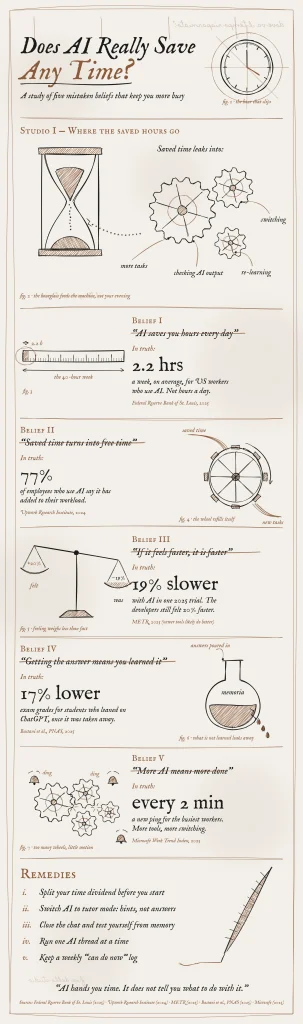
- Regular AI users save about one to two hours a week. Not hours a day.
- That time rarely becomes free time. It gets refilled with more tasks and more checking.
- A fast answer isn’t the same as learning. Students who leaned on ChatGPT scored 17% lower once it was gone.
- Decide where saved time goes, use AI as a tutor, and test yourself without it.
You use AI every day. It explains a topic in seconds. It summarizes long videos and drafts your notes. So you’d expect a lighter week.
But it looks like it hasn’t worked out that way you expected. Your list is still long. Your evenings are still full.
Many have now started sharing their discontent regarding their AI augmentation. They are skeptical about tall claims of AI productivity gains by influencers. They are questioning if AI saves time at all.
It does. But a handful of popular beliefs about AI and time don’t hold up.
Below are five of those myths that I noticed. I tried to check each one of them against recent research I could gather.
Belief 1: AI Saves You Hours Every Day
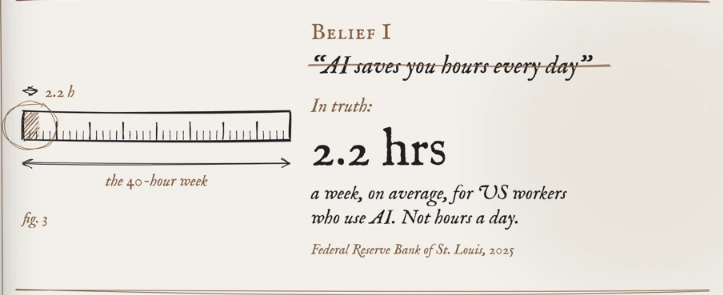
There is no doubt about the power of AI assistance, but actual gain also depends upon the user. As we are getting new data from latest research, actual time saving appears marginal.
- 2.2 hours a week. That’s the average time US workers who use generative AI say it saves them. It’s 5.4% of a 40-hour week (St. Louis Fed, 2025). These gains are largely informal.
- About one hour a week. AI chatbot users in a study of 25,000 Danish workers reported saving 2.8% of their work hours. Their earnings and recorded hours did not change (Humlum and Vestergaard, 2025).
That is some time saving but it’s an hour or two a week, not a few hours a day.
There’s a twist worth knowing. How often you use AI changes how much it saves.
- 1 in 3 daily users say AI saves them four or more hours a week. Among people who use it one day a week, only about 1 in 10 save that much (St. Louis Fed, 2025).
So the bigger savings go to people who build AI into a routine. For learners, that means using it the same way, for the same kind of task, every day. Random use gives random results.
Belief 2: Saved Time Turns Into Free Time
In 1930, the economist John Maynard Keynes guessed that his grandchildren’s generation might work about 15 hours a week (Keynes, 1930). Each worker is now producing far more each day on average since Keynes. Yet the working week never shrank to anything close.
Economists call this the rebound effect. When something gets cheaper, people do more of it. AI makes tasks cheaper in time. So you do more tasks. In fact, the Jevons paradox presents an even stronger case, where time consumption as a resource increases with the efficiency gains. It means you end up spending even more hours working than before AI, offsetting all the time saving.
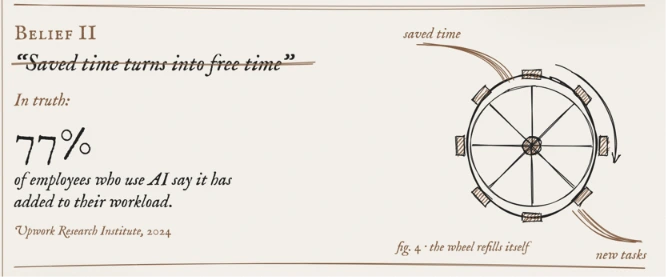
Researchers from Berkeley Haas saw it happen up close. They followed a US tech company of about 200 people for eight months. With AI, workers sped up, took on a wider range of work and stretched their day longer. Often nobody had asked them to (Ranganathan and Ye, 2026).
- 77% of employees who use AI say it has added to their workload (Upwork Research Institute, 2024).
Learners fall into the same loop. You finish one course faster, so you sign up for two more. AI helps you find and read a research paper in minutes. Then you spend the time you saved on sorting your notes so they make sense later. Work quickly fills up the time you saved.
Belief 3: If It Feels Faster, It Is Faster
In early 2025, the research group METR ran a controlled trial with 16 experienced software developers. They worked on 246 real tasks from their own projects. Each task was randomly set to allow AI or not.
- 19% slower. Tasks took longer with AI. The developers had expected a 24% speedup. Even afterward, they believed AI had made them 20% faster (METR, 2025).
AI tools have improved since. In 2026, METR said newer tools likely do speed developers up. Its new data couldn’t pin down by how much (METR, 2026).
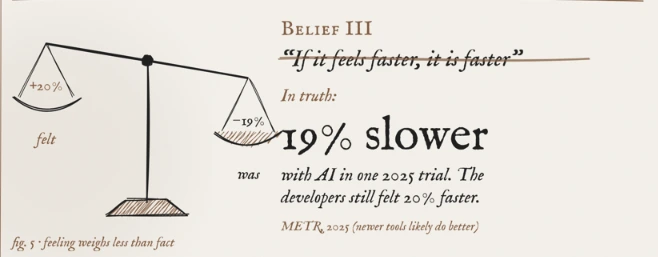
The part that lasts is the gap between feeling and fact. AI feels fast because the first draft appears in seconds. The checking, fixing and redoing are not registered by us as extended work to complete the same task, but as separate tasks.
- 39% of employees using AI say they now spend more time reviewing or moderating AI-made content (Upwork, 2024).
Studying works the same way. A neat AI explanation feels like progress. Whether it was progress only shows up when you tackle the problem alone.
Belief 4: Getting the Answer Means You Learned It
This is the myth that costs learners the most. Researchers at Wharton and Penn gave nearly 1,000 high school math students access to GPT-4. One group got a plain ChatGPT-style tool. Another got a tutor version that gave hints instead of answers.
- Although students performed 48% better on practice problems with the plain ChatGPT tool while they could use it, their exam grades dropped by 17% when the ChatGPT access was taken away, compared to the students who never had it (Bastani et al., 2025).
- Interestingly, another group that used a tutor-mode ChatGPT avoided that drop in exam grades. But even they did not gain anything in performance over students who studied without AI. Both scored almost the same.
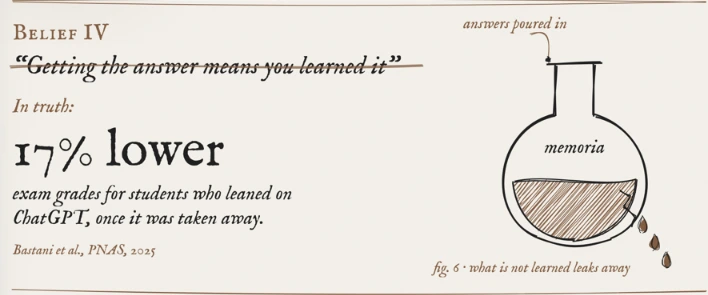
There is the hidden time cost. Anything you didn’t really learn, you’ll have to learn again. The hour AI saved today returns as a re-learning hour later. Usually right before an exam or an interview.
AI hands you time. It doesn’t tell you what to do with it. That choice is still yours.
Belief 5: More AI Means More Done
It’s tempting to keep three chats open, a summarizer running and an AI note-taker in the corner. More helpers should mean more output. In practice, they mostly mean more switching.
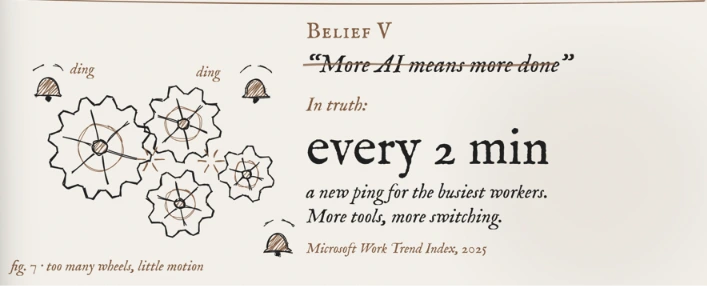
- Every 2 minutes. That’s how often the busiest Microsoft 365 users get a meeting, email or chat ping during core work hours. Nearly half of employees (48%) say with increased use of AI their work feels chaotic and fragmented (Microsoft, 2025).
In the Berkeley Haas study, workers ran several AI threads at once. They kept jumping between them to check results. The work felt productive. It also felt like constant juggling.
More AI output also means more to sort through. Some of it looks finished but isn’t.
- 41% of workers have received “workslop.” That’s AI output that looks polished but doesn’t move the task forward. Each case takes nearly two hours to fix (Niederhoffer et al., 2025).
Learning needs long, quiet stretches. Ten two-minute bursts across five AI tabs don’t add up to one 20-minute study session. They add up to ten fresh starts.
How to Keep the Time AI Saves You
Each step answers one myth. Start with the one you ticked least.
1. Split your time dividend before you start
Treat saved time like a small payout. Before an AI session, decide how you’ll split it. Half for rest and half for practice is a simple rule.
Write the split in your calendar. Time with a label is much harder to give away to another task.
2. Switch AI to tutor mode
The tutor group in the math study kept its learning. You can set up the same thing with one prompt:
“I’m learning [topic]. Don’t give me the answer. Ask me one question at a time. Give me a hint only when I’m stuck.”
Several AI chatbots now include a built-in study or guided-learning mode based on the same idea. Look for it in your chatbot’s tools or mode menu. If yours doesn’t have one, the prompt above works anywhere.
Or you can check out this skill and copy it into the AI tool of your choice: malkreide/socratic-method-skill: Die sokratische Methode als Claude Skill.md
3. Close the chat and test yourself
When a session ends, close the chat. Write three key points from memory. Or explain the idea out loud in two minutes.
If you get stuck, you read it but didn’t learn it. Review once and test again. A flashcard app helps you repeat the test a few days later.
If you are relying on YouTube lectures, you can check out tools like CoursifyYT, which brings the best of active learning to the YouTube lecture you are learning from.
4. Run one AI thread at a time
Keep one chat open while you study. Finish it before you start another.
Put your phone in focus mode for at least an hour. Use a browser extension that blocks distracting sites. It keeps the other tabs from pulling you away.
5. Keep a “can do now” log
Once a week, write one line: what can you do now that you couldn’t last week? Skip what you read or started. Count only what you can do.
Example: I can do the differential exercises from my maths textbook without help.
Feelings about speed can be badly off, as the developer trial showed. A written log can’t flatter you. Any notes app is enough.
AI does save time. Just be mindful of where your time goes.
Don’t let AI put you under any false beliefs. Ignore it and the hours slip into more tasks, more checking and more re-learning.
Frequently Asked Questions
Does AI really save time?
Yes, but less than most people expect. US workers who use generative AI report saving about 2.2 hours a week. A study of 25,000 Danish workers found about one hour a week. Daily users save the most. A third of them report four or more hours a week.
Why don’t I have more free time if AI makes me faster?
Saved time usually gets refilled. When tasks get faster, people take on more of them. A Berkeley Haas study found workers using AI sped up, widened their work and worked longer hours, often unasked. Checking AI output and switching between tools eat time too.
Why does AI feel faster than it really is?
The first draft appears in seconds, so the speed is easy to notice. The checking and fixing come later and are easy to forget. In one 2025 trial, developers were 19% slower with AI. They still believed it had made them 20% faster.
Is using AI bad for learning?
It depends on how you use it. Students who used a plain ChatGPT-style tool scored 17% lower on exams once AI was removed. Students who used a tutor version that gave hints instead of answers did not see that drop. AI that makes you think helps you learn.
How can I make AI actually save time when I study?
Decide what saved time is for before you start. Ask AI to quiz you and give hints instead of answers. Use one chat at a time. After each session, close the chat and write three points from memory. Track what you can do each week.
What is cognitive debt?
Cognitive debt is a term from a 2025 MIT Media Lab study. It describes what happens when you let AI do the thinking. Writing gets easier now, but you remember and understand less later. The study was small and early, so treat the finding as a warning sign.
Sources
- Federal Reserve Bank of St. Louis. (2025). The Impact of Generative AI on Work Productivity. On the Economy blog. https://www.stlouisfed.org/on-the-economy/2025/feb/impact-generative-ai-work-productivity (accessed October 2026)
- Humlum, A., & Vestergaard, E. (2025). Large Language Models, Small Labor Market Effects. Becker Friedman Institute, University of Chicago, Working Paper 2025-56. https://bfi.uchicago.edu/wp-content/uploads/2025/04/BFI_WP_2025-56-3.pdf
- Federal Reserve Bank of St. Louis. (2025). Generative AI, Productivity and the Future of Work. Open Vault blog. https://www.stlouisfed.org/open-vault/2025/oct/generative-ai-productivity-future-work (accessed October 2026)
- Keynes, J. M. (1930). Economic Possibilities for Our Grandchildren. Reprinted in Essays in Persuasion. http://www.econ.yale.edu/smith/econ116a/keynes1.pdf
- Ranganathan, A., & Ye, X. M. (2026). AI Doesn’t Reduce Work—It Intensifies It. Harvard Business Review. https://hbr.org/2026/02/ai-doesnt-reduce-work-it-intensifies-it
- Upwork Research Institute. (2024). Upwork Study Finds Employee Workloads Rising Despite Increased C-Suite Investment in Artificial Intelligence. Upwork. https://www.upwork.com/press/releases/upwork-study-finds-employee-workloads-rising-despite-increased-c-suite-investment-in-artificial-intelligence (accessed October 2026)
- Becker, J., Rush, N., Barnes, B., & Rein, D. (2025). Measuring the Impact of Early-2025 AI on Experienced Open-Source Developer Productivity. METR. https://metr.org/blog/2025-07-10-early-2025-ai-experienced-os-dev-study/
- Becker, J., Rush, N., Cunningham, T., Rein, D., & Mahamud, K. (2026). We Are Changing Our Developer Productivity Experiment Design. METR. https://metr.org/blog/2026-02-24-uplift-update/
- Bastani, H., Bastani, O., Sungu, A., Ge, H., Kabakcı, Ö., & Mariman, R. (2025). Generative AI without guardrails can harm learning: Evidence from high school mathematics. Proceedings of the National Academy of Sciences, 122(26). https://doi.org/10.1073/pnas.2422633122
- Microsoft. (2025). Breaking Down the Infinite Workday. Work Trend Index Special Report, WorkLab. https://www.microsoft.com/en-us/worklab/work-trend-index/breaking-down-infinite-workday (accessed October 2026)
- Niederhoffer, K., Kellerman, G. R., Lee, A., Liebscher, A., Rapuano, K., & Hancock, J. T. (2025). AI-Generated “Workslop” Is Destroying Productivity. Harvard Business Review. https://hbr.org/2025/09/ai-generated-workslop-is-destroying-productivity
- Kosmyna, N., et al. (2025). Your Brain on ChatGPT: Accumulation of Cognitive Debt when Using an AI Assistant for Essay Writing Task. MIT Media Lab, arXiv preprint. https://arxiv.org/abs/2506.08872